Raspberry Pi Pico: GPS-модуль NEO-6M – получение местоположения и времени (MicroPython)
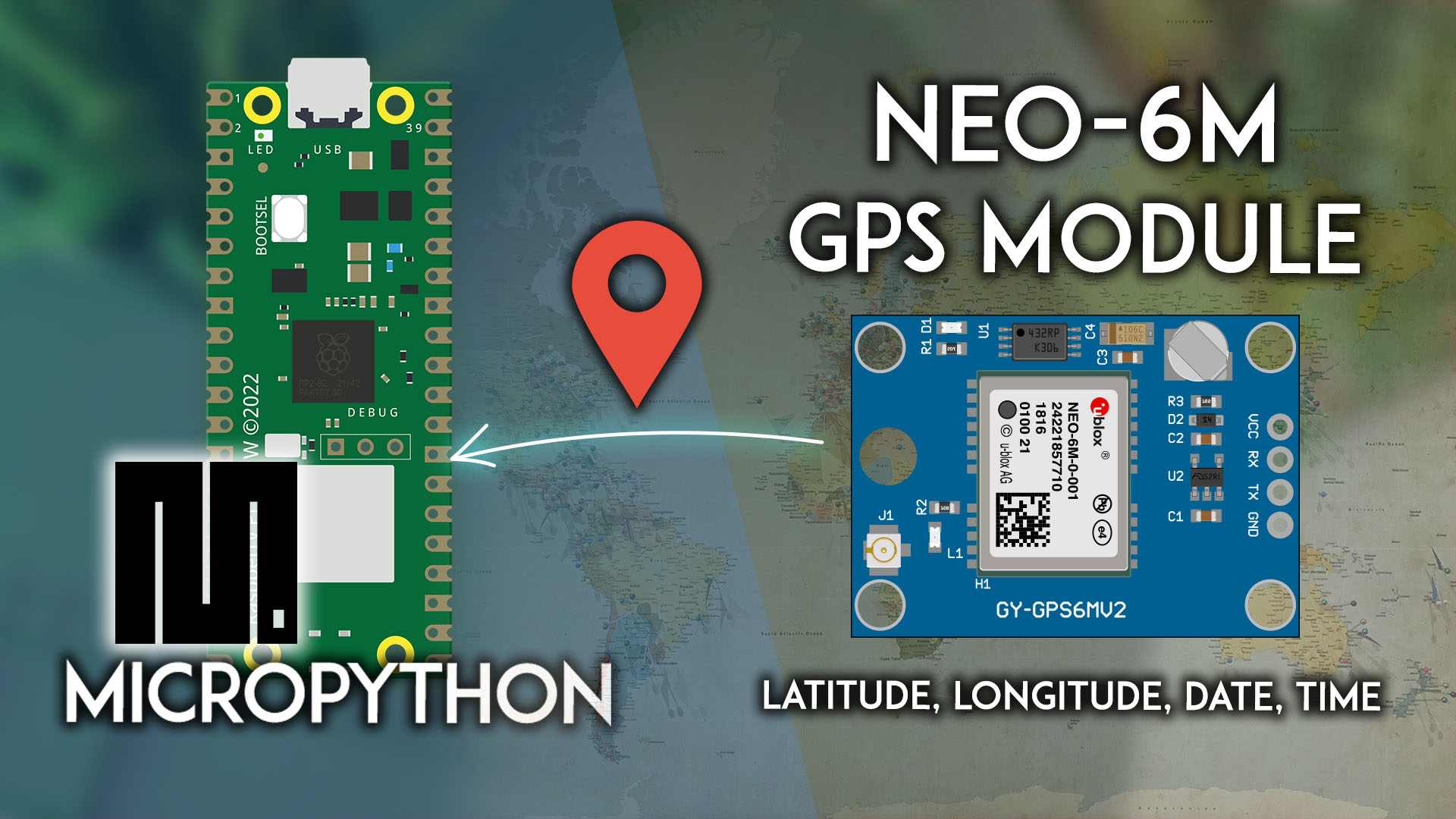
Узнайте, как подключить GPS-модуль NEO-6M к Raspberry Pi Pico для получения GPS-данных: широты, долготы, высоты, даты и времени. Мы покажем, как подключить модуль к Pico и установить последовательное соединение для получения данных с датчика. Мы будем программировать плату Raspberry Pi Pico с использованием прошивки MicroPython.
В этом руководстве мы рассмотрим следующие темы:
Предварительные требования – прошивка MicroPython
Для выполнения этого руководства вам необходима прошивка MicroPython, установленная на вашу плату Raspberry Pi Pico. Вам также нужна IDE для написания и загрузки кода на плату.
Рекомендуемой IDE для MicroPython на Raspberry Pi Pico является Thonny IDE. Следуйте следующему руководству, чтобы узнать, как установить Thonny IDE, прошить MicroPython и загрузить код на плату.
Знакомство с GPS-модулем NEO-6M
GPS-модуль NEO-6M – это GPS-приёмник, совместимый с большинством плат микроконтроллеров. Он может получать данные о местоположении, скорости, высоте и времени.
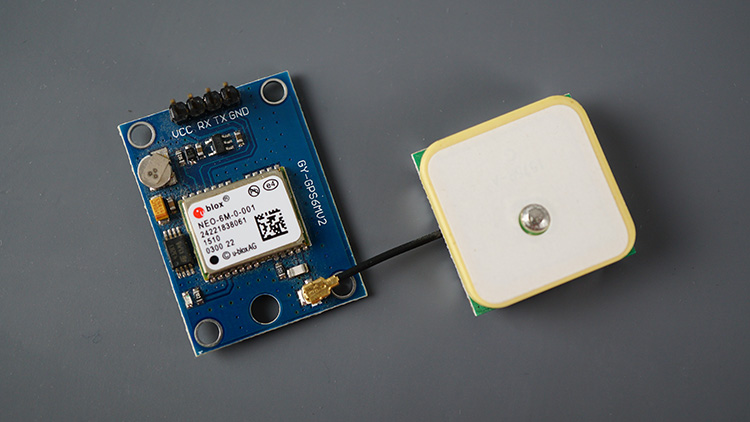
Он оснащён небольшой резервной батареей, внешней EEPROM и светодиодным индикатором сигнала. Этот светодиод начнёт мигать, когда модуль получит фиксацию позиции.
Обычно эти модули поставляются с керамической GPS-антенной.
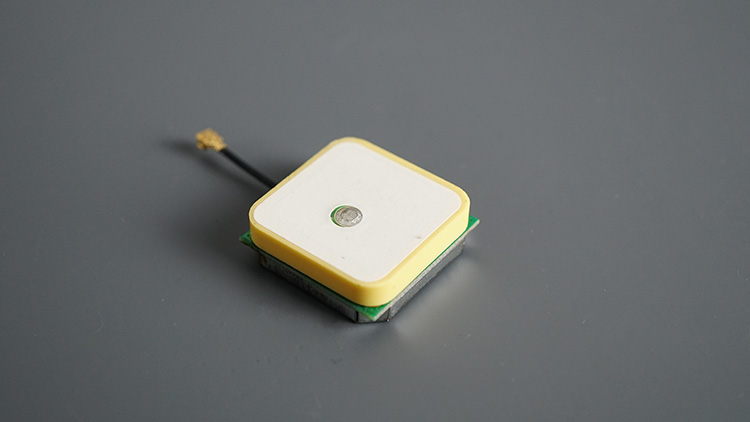
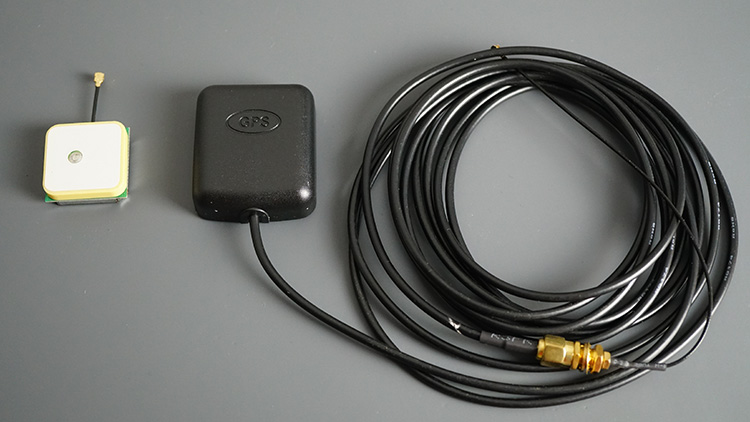
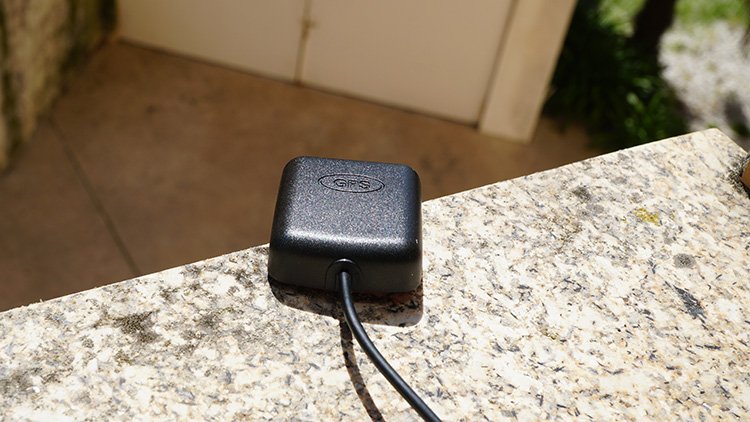
Но вы можете заменить её на любую другую совместимую антенну, которая лучше подойдёт для вашего проекта. Например, мне нравится использовать антенну справа на фото ниже, потому что она водонепроницаема, а антенна поставляется с длинным кабелем, что обеспечивает большую гибкость.
GPS-модуль NEO-6M взаимодействует с микроконтроллером по протоколу последовательной связи.
Этот модуль работает со стандартными NMEA-предложениями. NMEA расшифровывается как National Marine Electronics Association (Национальная ассоциация морской электроники), и в мире GPS это стандартный формат данных, поддерживаемый производителями GPS-оборудования.
Характеристики GPS-модуля NEO-6M
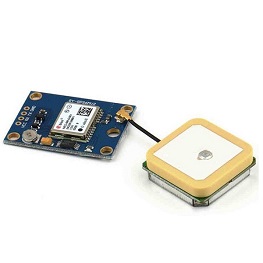
Основные характеристики:
Этот модуль имеет внешнюю антенну и встроенную EEPROM.
Интерфейс: RS232 TTL
Напряжение питания: от 3 В до 5 В
Скорость передачи данных по умолчанию: 9600 бит/с
Работает со стандартными NMEA-предложениями
Подключение GPS-модуля NEO-6M к Raspberry Pi Pico
Для получения данных от GPS-модуля NEO-6M нам необходимо установить последовательное соединение. Raspberry Pi Pico имеет следующие варианты выводов UART:
Интерфейс UART |
TX GPIO |
RX GPIO |
|---|---|---|
UART0 |
GPIO0, GPIO12, GPIO16 |
GPIO1, GPIO13, GPIO17 |
UART1 |
GPIO4, GPIO8 |
GPIO5, GPIO9 |
Мы будем использовать UART 1 и GPIO 4 (TX) и GPIO 5 (RX).
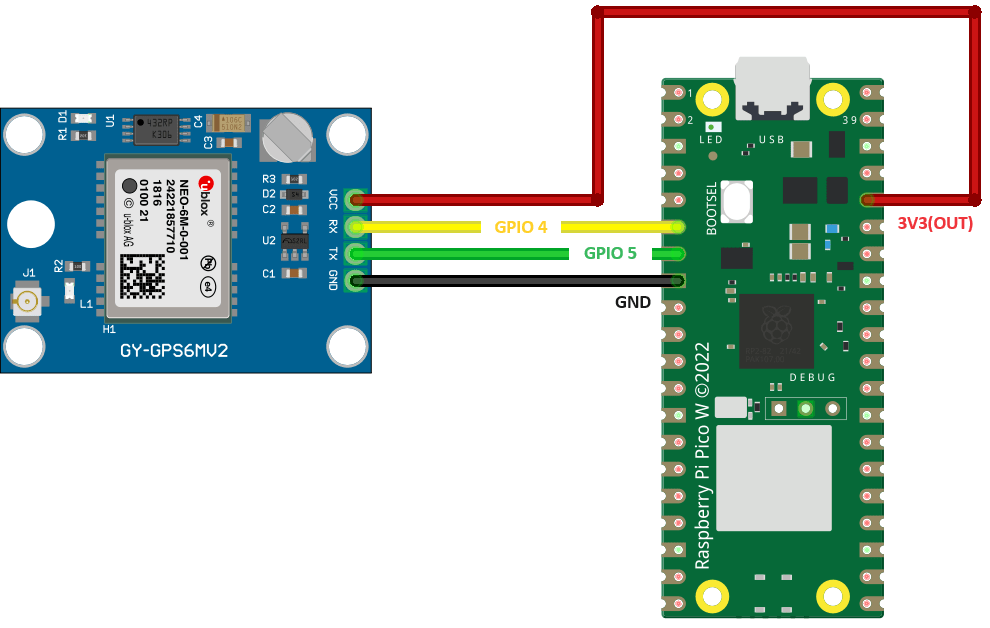
GPS-модуль NEO-6M |
Raspberry Pi Pico |
|---|---|
VCC |
3V3 |
RX |
TX (GPIO 4) (Pin 6) |
TX |
RX (GPIO 5) (Pin 7) |
GND |
GND |
Получение необработанных GPS-данных – тестирование GPS-модуля NEO-6M с Raspberry Pi Pico (MicroPython)
Для получения необработанных GPS-данных вам нужно просто установить последовательное соединение с GPS-модулем и прочитать доступные данные.
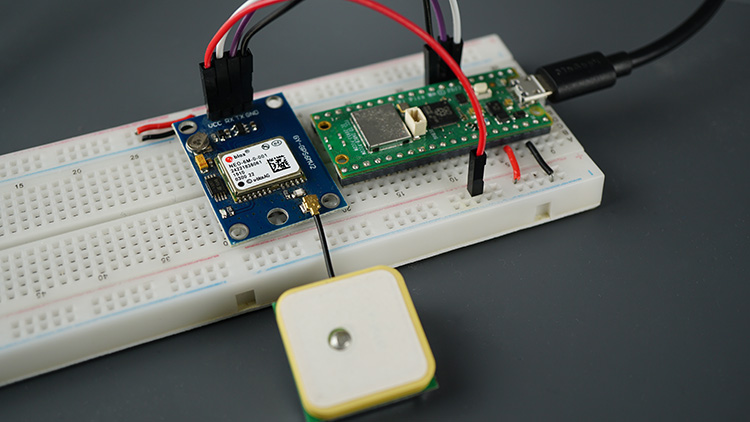
Следующий код устанавливает последовательное соединение с GPS-модулем и считывает доступные данные.
# Complete project details at https://RandomNerdTutorials.com/raspberry-pi-pico-neo-6m-micropython/

import machine
from time import sleep

# Define the UART pins and create a UART object
gps_serial = machine.UART(1, baudrate=9600, tx=4, rx=5)

while True:
    if gps_serial.any():
        line = gps_serial.readline()  # Read a complete line from the UART
        if line:
            line = line.decode('utf-8')
            print(line.strip())
    sleep(0.5)
Тестирование кода
После установления соединения с платой через Thonny IDE запустите предыдущий код.
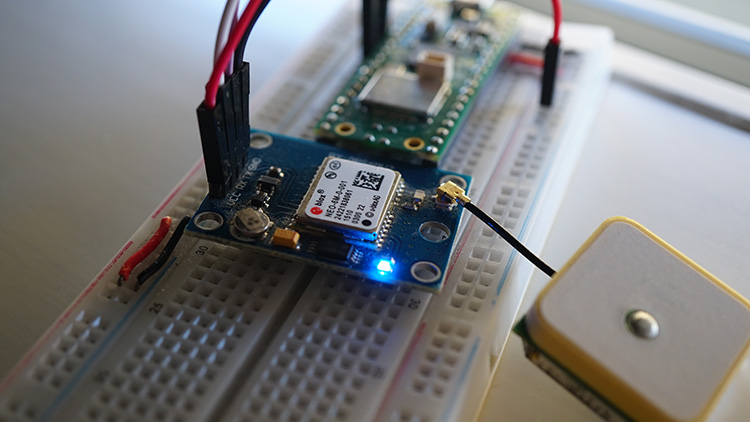
Убедитесь, что антенна подключена и что модуль или антенна расположены на улице или рядом с окном, чтобы они могли получать данные со спутников.
Синий светодиод модуля начнёт мигать, когда он найдёт фиксацию позиции – при первом запуске это может занять несколько минут.
В консоли отобразятся NMEA-предложения с GPS-данными.
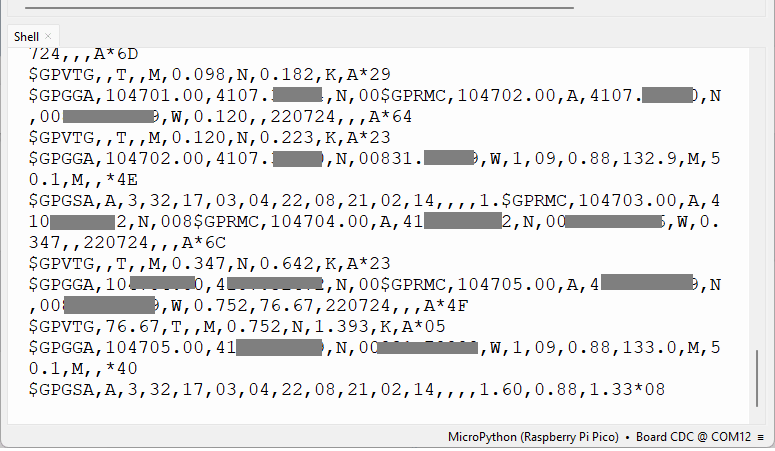
Каждая строка, которую вы получаете в мониторе последовательного порта, является NMEA-предложением.
NMEA расшифровывается как National Marine Electronics Association (Национальная ассоциация морской электроники), и в мире GPS это стандартный формат данных, поддерживаемый производителями GPS-оборудования.
NMEA-предложения
NMEA-предложения начинаются с символа $, и каждое поле данных разделяется запятой.
$GPRMC,110827.00,A,4107.32485,N,00831.79799,W,0.888,30.44,180724,,,A*4B
$GPVTG,30.44,T,,M,0.888,N,1.644,K,A*01
$GPGGA,110827.00,41XX.32485,N,00831.79799,W,1,07,0.99,123.1,M,50.1,M,,*48
$GPGSA,A,3,03,32,22,08,04,14,17,,,,,,2.25,0.99,2.02*0A
$GPGSV,3,1,11,3,11,22,26,296,29,27,01,142,,32,17,042,23*48
$GPGLL,4107.32485,N,00831.79799,W,110827.00,A,A*7F
Существуют различные типы NMEA-предложений. Тип сообщения обозначается символами перед первой запятой.
GP после $ указывает, что это GPS-позиция. $GPGGA – это базовое NMEA-сообщение GPS, которое предоставляет данные о 3D-местоположении и точности.
В следующем предложении:
$GPGGA,110827.00,41XX.32485,N,008XX.XXXXX,W,1,07,0.99,123.1,M,50.1,M,,*48
110827 – представляет время, когда была получена фиксация местоположения, 11:08:27 UTC
41XX.32845,N – широта 41 град. XX.32845, N
00831.79799,W – долгота 008 град. XX.XXXXX“ W
1 – качество фиксации (0 = недействительно; 1 = GPS-фиксация; 2 = DGPS-фиксация; 3 = PPS-фиксация; 4 = Real Time Kinematic; 5 = Float RTK; 6 = оценочное (dead reckoning); 7 = режим ручного ввода; 8 = режим симуляции)
07 – количество отслеживаемых спутников
0.99 – горизонтальное снижение точности (менее единицы – идеально)
123.1, M – высота в метрах над уровнем моря
50.1, M – высота геоида (средний уровень моря) над эллипсоидом WGS84
пустое поле – время в секундах с момента последнего обновления DGPS
пустое поле – номер станции DGPS
*48 – контрольная сумма, всегда начинается с *
Другие NMEA-предложения предоставляют дополнительную информацию:
$GPGSA – GPS DOP и активные спутники
$GPGSV – подробная информация о спутниках GPS
$GPGLL – географическая широта и долгота
$GPRMC – основные данные GPS pvt (позиция, скорость, время)
$GPVTG – результирующая скорость
Вы можете использовать этот онлайн-анализатор NMEA и вставить туда свои предложения для интерпретации GPS-данных.
Однако самый простой способ получить и интерпретировать нужные GPS-данные – это разобрать NMEA-предложения непосредственно в коде. Для этого мы будем использовать модуль micropyGPS.
Загрузка модуля micropyGPS
Для разбора NMEA-предложений от GPS-модуля и удобного получения GPS-данных мы будем использовать модуль micropyGPS. Эта библиотека не входит в стандартную библиотеку MicroPython по умолчанию. Поэтому вам нужно загрузить следующий файл на вашу плату Raspberry Pi Pico (сохраните его с именем micropyGPS.py).
"""
# MicropyGPS - a GPS NMEA sentence parser for Micropython/Python 3.X
# Copyright (c) 2017 Michael Calvin McCoy (mcalvinmccoy@gmail.com)
# The MIT License (MIT) - see LICENSE file
"""
# TODO:
# Time Since First Fix
# Distance/Time to Target
# More Helper Functions
# Dynamically limit sentences types to parse
from math import floor, modf
# Import utime or time for fix time handling
try:
# Assume running on MicroPython
import utime
except ImportError:
# Otherwise default to time module for non-embedded implementations
# Should still support millisecond resolution.
import time
class MicropyGPS(object):
"""GPS NMEA Sentence Parser. Creates object that stores all relevant GPS data and statistics.
Parses sentences one character at a time using update(). """
# Max Number of Characters a valid sentence can be (based on GGA sentence)
SENTENCE_LIMIT = 90
__HEMISPHERES = ('N', 'S', 'E', 'W')
__NO_FIX = 1
__FIX_2D = 2
__FIX_3D = 3
__DIRECTIONS = ('N', 'NNE', 'NE', 'ENE', 'E', 'ESE', 'SE', 'SSE', 'S', 'SSW', 'SW', 'WSW', 'W',
'WNW', 'NW', 'NNW')
__MONTHS = ('January', 'February', 'March', 'April', 'May',
'June', 'July', 'August', 'September', 'October',
'November', 'December')
def __init__(self, local_offset=0, location_formatting='ddm'):
"""
Setup GPS Object Status Flags, Internal Data Registers, etc
local_offset (int): Timzone Difference to UTC
location_formatting (str): Style For Presenting Longitude/Latitude:
Decimal Degree Minute (ddm) - 40° 26.767′ N
Degrees Minutes Seconds (dms) - 40° 26′ 46″ N
Decimal Degrees (dd) - 40.446° N
"""
#####################
# Object Status Flags
self.sentence_active = False
self.active_segment = 0
self.process_crc = False
self.gps_segments = []
self.crc_xor = 0
self.char_count = 0
self.fix_time = 0
#####################
# Sentence Statistics
self.crc_fails = 0
self.clean_sentences = 0
self.parsed_sentences = 0
#####################
# Logging Related
self.log_handle = None
self.log_en = False
#####################
# Data From Sentences
# Time
self.timestamp = [0, 0, 0.0]
self.date = [0, 0, 0]
self.local_offset = local_offset
# Position/Motion
self._latitude = [0, 0.0, 'N']
self._longitude = [0, 0.0, 'W']
self.coord_format = location_formatting
self.speed = [0.0, 0.0, 0.0]
self.course = 0.0
self.altitude = 0.0
self.geoid_height = 0.0
# GPS Info
self.satellites_in_view = 0
self.satellites_in_use = 0
self.satellites_used = []
self.last_sv_sentence = 0
self.total_sv_sentences = 0
self.satellite_data = dict()
self.hdop = 0.0
self.pdop = 0.0
self.vdop = 0.0
self.valid = False
self.fix_stat = 0
self.fix_type = 1
########################################
# Coordinates Translation Functions
########################################
@property
def latitude(self):
"""Format Latitude Data Correctly"""
if self.coord_format == 'dd':
decimal_degrees = self._latitude[0] + (self._latitude[1] / 60)
return [decimal_degrees, self._latitude[2]]
elif self.coord_format == 'dms':
minute_parts = modf(self._latitude[1])
seconds = round(minute_parts[0] * 60)
return [self._latitude[0], int(minute_parts[1]), seconds, self._latitude[2]]
else:
return self._latitude
@property
def longitude(self):
"""Format Longitude Data Correctly"""
if self.coord_format == 'dd':
decimal_degrees = self._longitude[0] + (self._longitude[1] / 60)
return [decimal_degrees, self._longitude[2]]
elif self.coord_format == 'dms':
minute_parts = modf(self._longitude[1])
seconds = round(minute_parts[0] * 60)
return [self._longitude[0], int(minute_parts[1]), seconds, self._longitude[2]]
else:
return self._longitude
########################################
# Logging Related Functions
########################################
def start_logging(self, target_file, mode="append"):
"""
Create GPS data log object
"""
# Set Write Mode Overwrite or Append
mode_code = 'w' if mode == 'new' else 'a'
try:
self.log_handle = open(target_file, mode_code)
except AttributeError:
print("Invalid FileName")
return False
self.log_en = True
return True
def stop_logging(self):
"""
Closes the log file handler and disables further logging
"""
try:
self.log_handle.close()
except AttributeError:
print("Invalid Handle")
return False
self.log_en = False
return True
def write_log(self, log_string):
"""Attempts to write the last valid NMEA sentence character to the active file handler
"""
try:
self.log_handle.write(log_string)
except TypeError:
return False
return True
########################################
# Sentence Parsers
########################################
def gprmc(self):
"""Parse Recommended Minimum Specific GPS/Transit data (RMC)Sentence.
Updates UTC timestamp, latitude, longitude, Course, Speed, Date, and fix status
"""
# UTC Timestamp
try:
utc_string = self.gps_segments[1]
if utc_string: # Possible timestamp found
hours = (int(utc_string[0:2]) + self.local_offset) % 24
minutes = int(utc_string[2:4])
seconds = float(utc_string[4:])
self.timestamp = [hours, minutes, seconds]
else: # No Time stamp yet
self.timestamp = [0, 0, 0.0]
except ValueError: # Bad Timestamp value present
return False
# Date stamp
try:
date_string = self.gps_segments[9]
# Date string printer function assumes to be year >=2000,
# date_string() must be supplied with the correct century argument to display correctly
if date_string: # Possible date stamp found
day = int(date_string[0:2])
month = int(date_string[2:4])
year = int(date_string[4:6])
self.date = (day, month, year)
else: # No Date stamp yet
self.date = (0, 0, 0)
except ValueError: # Bad Date stamp value present
return False
# Check Receiver Data Valid Flag
if self.gps_segments[2] == 'A': # Data from Receiver is Valid/Has Fix
# Longitude / Latitude
try:
# Latitude
l_string = self.gps_segments[3]
lat_degs = int(l_string[0:2])
lat_mins = float(l_string[2:])
lat_hemi = self.gps_segments[4]
# Longitude
l_string = self.gps_segments[5]
lon_degs = int(l_string[0:3])
lon_mins = float(l_string[3:])
lon_hemi = self.gps_segments[6]
except ValueError:
return False
if lat_hemi not in self.__HEMISPHERES:
return False
if lon_hemi not in self.__HEMISPHERES:
return False
# Speed
try:
spd_knt = float(self.gps_segments[7])
except ValueError:
return False
# Course
try:
if self.gps_segments[8]:
course = float(self.gps_segments[8])
else:
course = 0.0
except ValueError:
return False
# TODO - Add Magnetic Variation
# Update Object Data
self._latitude = [lat_degs, lat_mins, lat_hemi]
self._longitude = [lon_degs, lon_mins, lon_hemi]
# Include mph and hm/h
self.speed = [spd_knt, spd_knt * 1.151, spd_knt * 1.852]
self.course = course
self.valid = True
# Update Last Fix Time
self.new_fix_time()
else: # Clear Position Data if Sentence is 'Invalid'
self._latitude = [0, 0.0, 'N']
self._longitude = [0, 0.0, 'W']
self.speed = [0.0, 0.0, 0.0]
self.course = 0.0
self.valid = False
return True
def gpgll(self):
"""Parse Geographic Latitude and Longitude (GLL)Sentence. Updates UTC timestamp, latitude,
longitude, and fix status"""
# UTC Timestamp
try:
utc_string = self.gps_segments[5]
if utc_string: # Possible timestamp found
hours = (int(utc_string[0:2]) + self.local_offset) % 24
minutes = int(utc_string[2:4])
seconds = float(utc_string[4:])
self.timestamp = [hours, minutes, seconds]
else: # No Time stamp yet
self.timestamp = [0, 0, 0.0]
except ValueError: # Bad Timestamp value present
return False
# Check Receiver Data Valid Flag
if self.gps_segments[6] == 'A': # Data from Receiver is Valid/Has Fix
# Longitude / Latitude
try:
# Latitude
l_string = self.gps_segments[1]
lat_degs = int(l_string[0:2])
lat_mins = float(l_string[2:])
lat_hemi = self.gps_segments[2]
# Longitude
l_string = self.gps_segments[3]
lon_degs = int(l_string[0:3])
lon_mins = float(l_string[3:])
lon_hemi = self.gps_segments[4]
except ValueError:
return False
if lat_hemi not in self.__HEMISPHERES:
return False
if lon_hemi not in self.__HEMISPHERES:
return False
# Update Object Data
self._latitude = [lat_degs, lat_mins, lat_hemi]
self._longitude = [lon_degs, lon_mins, lon_hemi]
self.valid = True
# Update Last Fix Time
self.new_fix_time()
else: # Clear Position Data if Sentence is 'Invalid'
self._latitude = [0, 0.0, 'N']
self._longitude = [0, 0.0, 'W']
self.valid = False
return True
def gpvtg(self):
"""Parse Track Made Good and Ground Speed (VTG) Sentence. Updates speed and course"""
try:
course = float(self.gps_segments[1]) if self.gps_segments[1] else 0.0
spd_knt = float(self.gps_segments[5]) if self.gps_segments[5] else 0.0
except ValueError:
return False
# Include mph and km/h
self.speed = (spd_knt, spd_knt * 1.151, spd_knt * 1.852)
self.course = course
return True
def gpgga(self):
"""Parse Global Positioning System Fix Data (GGA) Sentence. Updates UTC timestamp, latitude, longitude,
fix status, satellites in use, Horizontal Dilution of Precision (HDOP), altitude, geoid height and fix status"""
try:
# UTC Timestamp
utc_string = self.gps_segments[1]
# Skip timestamp if receiver doesn't have on yet
if utc_string:
hours = (int(utc_string[0:2]) + self.local_offset) % 24
minutes = int(utc_string[2:4])
seconds = float(utc_string[4:])
else:
hours = 0
minutes = 0
seconds = 0.0
# Number of Satellites in Use
satellites_in_use = int(self.gps_segments[7])
# Get Fix Status
fix_stat = int(self.gps_segments[6])
except (ValueError, IndexError):
return False
try:
# Horizontal Dilution of Precision
hdop = float(self.gps_segments[8])
except (ValueError, IndexError):
hdop = 0.0
# Process Location and Speed Data if Fix is GOOD
if fix_stat:
# Longitude / Latitude
try:
# Latitude
l_string = self.gps_segments[2]
lat_degs = int(l_string[0:2])
lat_mins = float(l_string[2:])
lat_hemi = self.gps_segments[3]
# Longitude
l_string = self.gps_segments[4]
lon_degs = int(l_string[0:3])
lon_mins = float(l_string[3:])
lon_hemi = self.gps_segments[5]
except ValueError:
return False
if lat_hemi not in self.__HEMISPHERES:
return False
if lon_hemi not in self.__HEMISPHERES:
return False
# Altitude / Height Above Geoid
try:
altitude = float(self.gps_segments[9])
geoid_height = float(self.gps_segments[11])
except ValueError:
altitude = 0
geoid_height = 0
# Update Object Data
self._latitude = [lat_degs, lat_mins, lat_hemi]
self._longitude = [lon_degs, lon_mins, lon_hemi]
self.altitude = altitude
self.geoid_height = geoid_height
# Update Object Data
self.timestamp = [hours, minutes, seconds]
self.satellites_in_use = satellites_in_use
self.hdop = hdop
self.fix_stat = fix_stat
# If Fix is GOOD, update fix timestamp
if fix_stat:
self.new_fix_time()
return True
def gpgsa(self):
"""Parse GNSS DOP and Active Satellites (GSA) sentence. Updates GPS fix type, list of satellites used in
fix calculation, Position Dilution of Precision (PDOP), Horizontal Dilution of Precision (HDOP), Vertical
Dilution of Precision, and fix status"""
# Fix Type (None,2D or 3D)
try:
fix_type = int(self.gps_segments[2])
except ValueError:
return False
# Read All (up to 12) Available PRN Satellite Numbers
sats_used = []
for sats in range(12):
sat_number_str = self.gps_segments[3 + sats]
if sat_number_str:
try:
sat_number = int(sat_number_str)
sats_used.append(sat_number)
except ValueError:
return False
else:
break
# PDOP,HDOP,VDOP
try:
pdop = float(self.gps_segments[15])
hdop = float(self.gps_segments[16])
vdop = float(self.gps_segments[17])
except ValueError:
return False
# Update Object Data
self.fix_type = fix_type
# If Fix is GOOD, update fix timestamp
if fix_type > self.__NO_FIX:
self.new_fix_time()
self.satellites_used = sats_used
self.hdop = hdop
self.vdop = vdop
self.pdop = pdop
return True
def gpgsv(self):
"""Parse Satellites in View (GSV) sentence. Updates number of SV Sentences,the number of the last SV sentence
parsed, and data on each satellite present in the sentence"""
try:
num_sv_sentences = int(self.gps_segments[1])
current_sv_sentence = int(self.gps_segments[2])
sats_in_view = int(self.gps_segments[3])
except ValueError:
return False
# Create a blank dict to store all the satellite data from this sentence in:
# satellite PRN is key, tuple containing telemetry is value
satellite_dict = dict()
# Calculate Number of Satelites to pull data for and thus how many segment positions to read
if num_sv_sentences == current_sv_sentence:
# Last sentence may have 1-4 satellites; 5 - 20 positions
sat_segment_limit = (sats_in_view - ((num_sv_sentences - 1) * 4)) * 5
else:
sat_segment_limit = 20 # Non-last sentences have 4 satellites and thus read up to position 20
# Try to recover data for up to 4 satellites in sentence
for sats in range(4, sat_segment_limit, 4):
# If a PRN is present, grab satellite data
if self.gps_segments[sats]:
try:
sat_id = int(self.gps_segments[sats])
except (ValueError,IndexError):
return False
try: # elevation can be null (no value) when not tracking
elevation = int(self.gps_segments[sats+1])
except (ValueError,IndexError):
elevation = None
try: # azimuth can be null (no value) when not tracking
azimuth = int(self.gps_segments[sats+2])
except (ValueError,IndexError):
azimuth = None
try: # SNR can be null (no value) when not tracking
snr = int(self.gps_segments[sats+3])
except (ValueError,IndexError):
snr = None
# If no PRN is found, then the sentence has no more satellites to read
else:
break
# Add Satellite Data to Sentence Dict
satellite_dict[sat_id] = (elevation, azimuth, snr)
# Update Object Data
self.total_sv_sentences = num_sv_sentences
self.last_sv_sentence = current_sv_sentence
self.satellites_in_view = sats_in_view
# For a new set of sentences, we either clear out the existing sat data or
# update it as additional SV sentences are parsed
if current_sv_sentence == 1:
self.satellite_data = satellite_dict
else:
self.satellite_data.update(satellite_dict)
return True
##########################################
# Data Stream Handler Functions
##########################################
def new_sentence(self):
"""Adjust Object Flags in Preparation for a New Sentence"""
self.gps_segments = ['']
self.active_segment = 0
self.crc_xor = 0
self.sentence_active = True
self.process_crc = True
self.char_count = 0
def update(self, new_char):
"""Process a new input char and updates GPS object if necessary based on special characters ('$', ',', '*')
Function builds a list of received string that are validate by CRC prior to parsing by the appropriate
sentence function. Returns sentence type on successful parse, None otherwise"""
valid_sentence = False
# Validate new_char is a printable char
ascii_char = ord(new_char)
if 10 <= ascii_char <= 126:
self.char_count += 1
# Write Character to log file if enabled
if self.log_en:
self.write_log(new_char)
# Check if a new string is starting ($)
if new_char == '$':
self.new_sentence()
return None
elif self.sentence_active:
# Check if sentence is ending (*)
if new_char == '*':
self.process_crc = False
self.active_segment += 1
self.gps_segments.append('')
return None
# Check if a section is ended (,), Create a new substring to feed
# characters to
elif new_char == ',':
self.active_segment += 1
self.gps_segments.append('')
# Store All Other printable character and check CRC when ready
else:
self.gps_segments[self.active_segment] += new_char
# When CRC input is disabled, sentence is nearly complete
if not self.process_crc:
if len(self.gps_segments[self.active_segment]) == 2:
try:
final_crc = int(self.gps_segments[self.active_segment], 16)
if self.crc_xor == final_crc:
valid_sentence = True
else:
self.crc_fails += 1
except ValueError:
pass # CRC Value was deformed and could not have been correct
# Update CRC
if self.process_crc:
self.crc_xor ^= ascii_char
# If a Valid Sentence Was received and it's a supported sentence, then parse it!!
if valid_sentence:
self.clean_sentences += 1 # Increment clean sentences received
self.sentence_active = False # Clear Active Processing Flag
if self.gps_segments[0] in self.supported_sentences:
# parse the Sentence Based on the message type, return True if parse is clean
if self.supported_sentences[self.gps_segments[0]](self):
# Let host know that the GPS object was updated by returning parsed sentence type
self.parsed_sentences += 1
return self.gps_segments[0]
# Check that the sentence buffer isn't filling up with Garage waiting for the sentence to complete
if self.char_count > self.SENTENCE_LIMIT:
self.sentence_active = False
# Tell Host no new sentence was parsed
return None
def new_fix_time(self):
"""Updates a high resolution counter with current time when fix is updated. Currently only triggered from
GGA, GSA and RMC sentences"""
try:
self.fix_time = utime.ticks_ms()
except NameError:
self.fix_time = time.time()
#########################################
# User Helper Functions
# These functions make working with the GPS object data easier
#########################################
def satellite_data_updated(self):
"""
Checks if the all the GSV sentences in a group have been read, making satellite data complete
:return: boolean
"""
if self.total_sv_sentences > 0 and self.total_sv_sentences == self.last_sv_sentence:
return True
else:
return False
def unset_satellite_data_updated(self):
"""
Mark GSV sentences as read indicating the data has been used and future updates are fresh
"""
self.last_sv_sentence = 0
def satellites_visible(self):
"""
Returns a list of of the satellite PRNs currently visible to the receiver
:return: list
"""
return list(self.satellite_data.keys())
def time_since_fix(self):
"""Returns number of millisecond since the last sentence with a valid fix was parsed. Returns 0 if
no fix has been found"""
# Test if a Fix has been found
if self.fix_time == 0:
return -1
# Try calculating fix time using utime; if not running MicroPython
# time.time() returns a floating point value in secs
try:
current = utime.ticks_diff(utime.ticks_ms(), self.fix_time)
except NameError:
current = (time.time() - self.fix_time) * 1000 # ms
return current
def compass_direction(self):
"""
Determine a cardinal or inter-cardinal direction based on current course.
:return: string
"""
# Calculate the offset for a rotated compass
if self.course >= 348.75:
offset_course = 360 - self.course
else:
offset_course = self.course + 11.25
# Each compass point is separated by 22.5 degrees, divide to find lookup value
dir_index = floor(offset_course / 22.5)
final_dir = self.__DIRECTIONS[dir_index]
return final_dir
def latitude_string(self):
"""
Create a readable string of the current latitude data
:return: string
"""
if self.coord_format == 'dd':
formatted_latitude = self.latitude
lat_string = str(formatted_latitude[0]) + '° ' + str(self._latitude[2])
elif self.coord_format == 'dms':
formatted_latitude = self.latitude
lat_string = str(formatted_latitude[0]) + '° ' + str(formatted_latitude[1]) + "' " + str(formatted_latitude[2]) + '" ' + str(formatted_latitude[3])
else:
lat_string = str(self._latitude[0]) + '° ' + str(self._latitude[1]) + "' " + str(self._latitude[2])
return lat_string
def longitude_string(self):
"""
Create a readable string of the current longitude data
:return: string
"""
if self.coord_format == 'dd':
formatted_longitude = self.longitude
lon_string = str(formatted_longitude[0]) + '° ' + str(self._longitude[2])
elif self.coord_format == 'dms':
formatted_longitude = self.longitude
lon_string = str(formatted_longitude[0]) + '° ' + str(formatted_longitude[1]) + "' " + str(formatted_longitude[2]) + '" ' + str(formatted_longitude[3])
else:
lon_string = str(self._longitude[0]) + '° ' + str(self._longitude[1]) + "' " + str(self._longitude[2])
return lon_string
def speed_string(self, unit='kph'):
"""
Creates a readable string of the current speed data in one of three units
:param unit: string of 'kph','mph, or 'knot'
:return:
"""
if unit == 'mph':
speed_string = str(self.speed[1]) + ' mph'
elif unit == 'knot':
if self.speed[0] == 1:
unit_str = ' knot'
else:
unit_str = ' knots'
speed_string = str(self.speed[0]) + unit_str
else:
speed_string = str(self.speed[2]) + ' km/h'
return speed_string
def date_string(self, formatting='s_mdy', century='20'):
"""
Creates a readable string of the current date.
Can select between long format: Januray 1st, 2014
or two short formats:
11/01/2014 (MM/DD/YYYY)
01/11/2014 (DD/MM/YYYY)
:param formatting: string 's_mdy', 's_dmy', or 'long'
:param century: int delineating the century the GPS data is from (19 for 19XX, 20 for 20XX)
:return: date_string string with long or short format date
"""
# Long Format Januray 1st, 2014
if formatting == 'long':
# Retrieve Month string from private set
month = self.__MONTHS[self.date[1] - 1]
# Determine Date Suffix
if self.date[0] in (1, 21, 31):
suffix = 'st'
elif self.date[0] in (2, 22):
suffix = 'nd'
elif self.date[0] == (3, 23):
suffix = 'rd'
else:
suffix = 'th'
day = str(self.date[0]) + suffix # Create Day String
year = century + str(self.date[2]) # Create Year String
date_string = month + ' ' + day + ', ' + year # Put it all together
else:
# Add leading zeros to day string if necessary
if self.date[0] < 10:
day = '0' + str(self.date[0])
else:
day = str(self.date[0])
# Add leading zeros to month string if necessary
if self.date[1] < 10:
month = '0' + str(self.date[1])
else:
month = str(self.date[1])
# Add leading zeros to year string if necessary
if self.date[2] < 10:
year = '0' + str(self.date[2])
else:
year = str(self.date[2])
# Build final string based on desired formatting
if formatting == 's_dmy':
date_string = day + '/' + month + '/' + year
else: # Default date format
date_string = month + '/' + day + '/' + year
return date_string
# All the currently supported NMEA sentences
supported_sentences = {'GPRMC': gprmc, 'GLRMC': gprmc,
'GPGGA': gpgga, 'GLGGA': gpgga,
'GPVTG': gpvtg, 'GLVTG': gpvtg,
'GPGSA': gpgsa, 'GLGSA': gpgsa,
'GPGSV': gpgsv, 'GLGSV': gpgsv,
'GPGLL': gpgll, 'GLGLL': gpgll,
'GNGGA': gpgga, 'GNRMC': gprmc,
'GNVTG': gpvtg, 'GNGLL': gpgll,
'GNGSA': gpgsa,
}
if __name__ == "__main__":
pass
Вот общие инструкции по загрузке библиотеки micropyGPS на вашу плату:
Сначала убедитесь, что на вашей плате установлена прошивка MicroPython – смотрите раздел Предварительные требования – прошивка MicroPython.
Создайте новый файл в вашей IDE с именем micropyGPS.py и вставьте туда предыдущий код. Сохраните этот файл.
Установите последовательное соединение с вашей платой через IDE.
Загрузите файл micropyGPS.py на вашу плату. В Thonny IDE перейдите в File > Save as… и выберите MicroPython Device / Raspberry Pi Pico.
На этом этапе библиотека должна быть успешно загружена на вашу плату. Теперь вы можете использовать функциональность библиотеки в своём коде, импортировав библиотеку import micropyGPS.
Raspberry Pi Pico с NEO-6M: получение GPS-данных с помощью MicroPython
Библиотека micropyGPS упрощает получение GPS-данных в удобном для понимания формате.
Следующий код показывает, как использовать библиотеку для получения GPS-данных, таких как широта, долгота, высота, дата и время, количество видимых спутников и HDOP (показатель точности сигнала).
После импорта библиотеки micropyGPS на вашу плату вы можете запустить следующий код.
# Complete project details at https://RandomNerdTutorials.com/raspberry-pi-pico-neo-6m-micropython/

from machine import UART, Pin
from time import sleep
from micropyGPS import MicropyGPS

# Instantiate the micropyGPS object
my_gps = MicropyGPS()

# Define the UART pins and create a UART object
gps_serial = UART(1, baudrate=9600, tx=Pin(4), rx=Pin(5))

while True:
    try:
        while gps_serial.any():
            data = gps_serial.read()
            for byte in data:
                stat = my_gps.update(chr(byte))
                if stat is not None:
                    # Print parsed GPS data
                    print('UTC Timestamp:', my_gps.timestamp)
                    print('Date:', my_gps.date_string('long'))
                    print('Latitude:', my_gps.latitude_string())
                    print('Longitude:', my_gps.longitude_string())
                    print('Altitude:', my_gps.altitude)
                    print('Satellites in use:', my_gps.satellites_in_use)
                    print('Horizontal Dilution of Precision:', my_gps.hdop)
                    print()

    except Exception as e:
        print(f"An error occurred: {e}")
Как работает код?
Продолжайте чтение, чтобы узнать, как работает код, или перейдите к разделу Демонстрация.
Сначала импортируем необходимые модули, включая класс MicropyGPS из ранее импортированного модуля micropyGPS.
from machine import UART, Pin
from time import sleep
from micropyGPS import MicropyGPS
Создайте экземпляр класса MicropyGPS с именем my_gps.
# Instantiate the micropyGPS object
my_gps = MicropyGPS()
Затем инициализируйте экземпляр UART для последовательной связи с модулем. Мы используем UART 1 и GPIO 4 для TX и GPIO 5 для RX. Мы также определяем скорость передачи данных для GPS-модуля (NEO-6M использует 9600).
gps_serial = UART(1, baudrate=9600, tx=Pin(4), rx=Pin(5))
Затем мы создаём бесконечный цикл для непрерывного чтения GPS-данных.
Мы проверяем, есть ли новые данные, доступные для чтения. Если есть, мы считываем данные и передаём их экземпляру my_gps с помощью метода update().
while gps_serial.any():
    data = gps_serial.read()
    for byte in data:
        stat = my_gps.update(chr(byte))
Метод update() возвращает допустимые предложения GPS или None, если это не так. Поэтому мы проверяем наличие допустимых данных перед продолжением.
if stat is not None:
Затем мы можем получить доступ к GPS-данным, используя методы micropyGPS для объекта my_gps, который должен содержать данные, полученные от GPS-модуля.
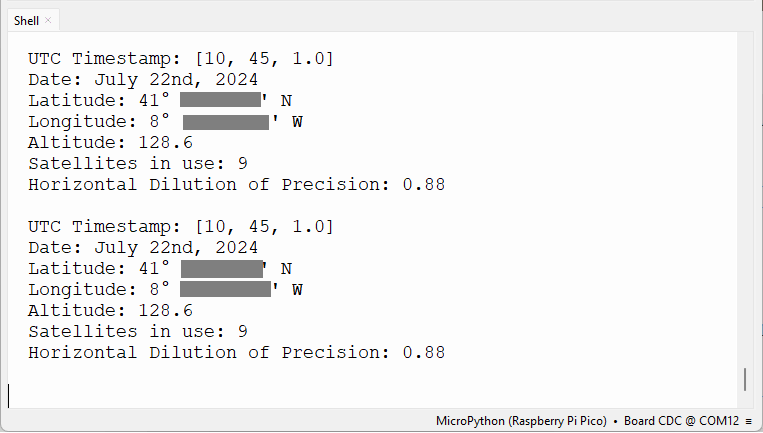
Следующие строки показывают, как получить время, дату, широту, долготу, высоту, количество используемых спутников и HDOP.
# Print parsed GPS data
print('UTC Timestamp:', my_gps.timestamp)
print('Date:', my_gps.date_string('long'))
print('Latitude:', my_gps.latitude_string())
print('Longitude:', my_gps.longitude_string())
print('Altitude:', my_gps.altitude)
print('Satellites in use:', my_gps.satellites_in_use)
print('Horizontal Dilution of Precision:', my_gps.hdop)
print()
Библиотека micropyGPS поддерживает другие методы для получения дополнительных GPS-данных и в различных форматах. Мы рекомендуем ознакомиться с документацией и посмотреть все доступные варианты.
Демонстрация
После загрузки модуля micropyGPS на вашу плату вы можете запустить предыдущий код для получения GPS-данных.
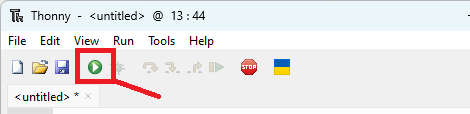
Убедитесь, что вы разместили плату или антенну рядом с окном, а лучше на улице, чтобы она могла получать данные со спутников. Вам может потребоваться подождать несколько минут, пока модуль получит фиксацию позиции и сможет отправлять корректные данные. Синий светодиод GPS-модуля NEO-6M начнёт мигать, когда он будет готов.
В консоли MicroPython вы должны получить информацию о вашем текущем местоположении, дате и времени в UTC, количестве спутников и HDOP. Чем больше количество спутников и чем ниже HDOP, тем лучше.
Заключение
В этом руководстве вы узнали, как использовать GPS-модуль NEO-6M с Raspberry Pi Pico с помощью MicroPython. Вы научились получать своё текущее местоположение, дату и время.
Теперь вы можете развить этот проект дальше и отобразить данные на OLED-дисплее или LCD-экране. Вы можете ознакомиться со следующими руководствами, чтобы узнать, как использовать эти дисплеи с Raspberry Pi Pico: