Teensy/Arduino – Игра на память (Memory Game)
Этот проект посвящён созданию простой игры для проверки вашей памяти.
Я буду использовать плату Teensy 3.0. Если вы хотите узнать больше об этой плате, пожалуйста, нажмите сюда, чтобы прочитать руководство по началу работы, которое я создал несколько дней назад. Этот проект также на 100% совместим с Arduino.
Посмотрите видео ниже, чтобы увидеть, как это работает
Примечание
Видео было доступно на оригинальной странице проекта, но встраиваемый код недоступен.
Необходимые компоненты
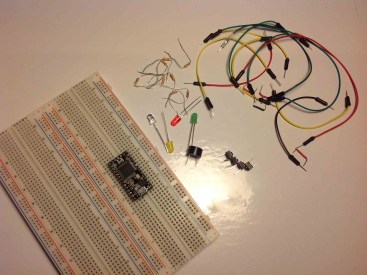
1x Teensy 3.0 (или Arduino UNO – читайте Лучшие стартовые наборы Arduino)
Вы можете использовать приведённые выше ссылки или перейти напрямую на MakerAdvisor.com/tools, чтобы найти все компоненты для ваших проектов по лучшей цене!
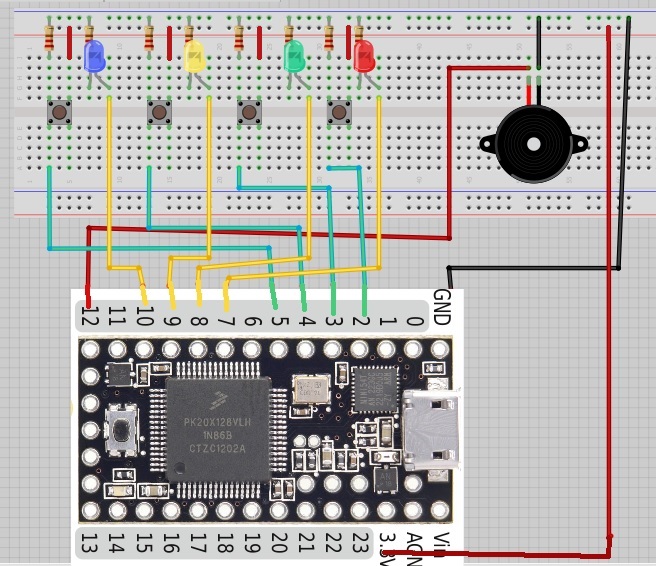
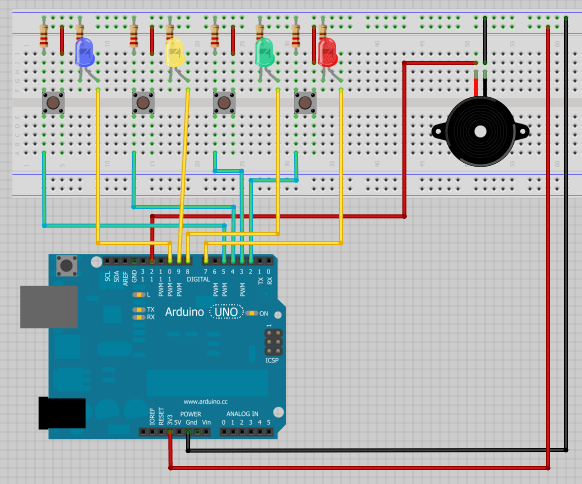
Схемы подключения
Teensy
Arduino
Загрузите приведённый ниже код
Этот код работает как с Teensy, так и с Arduino.
/*
  Memory Game with Arduino
  Based on a project by Jeremy Wilson
  Modified by Rui Santos
  Visit: https://randomnerdtutorials.com
*/

// Constants
const int button1 = 2;          // 1st button controls Blue LED
const int button2 = 3;          // 2nd button controls Yellow LED
const int button3 = 4;          // 3rd button controls Green LED
const int button4 = 5;          // 4th button controls Red LED
const int led1 = 7;             // Blue LED
const int led2 = 8;             // Yellow LED
const int led3 = 9;             // Green LED
const int led4 = 10;            // Red LED
const int buzzer = 12;          // Buzzer Output
const int tones[] = {1915, 1700, 1519, 1432, 2700}; // tones when you press the LED's - the last one is when you fail.

// Variables
int buttonState[] = {0,0,0,0};         // current state of the button
int lastButtonState[] = {0,0,0,0};     // previous state of the button
int buttonPushCounter[] = {0,0,0,0};

void playTone(int tone, int duration) {
  for (long i = 0; i < duration * 1000L; i += tone * 2) {
    digitalWrite(buzzer, HIGH);
    delayMicroseconds(tone);
    digitalWrite(buzzer, LOW);
    delayMicroseconds(tone);
  }
}

void setup() {
  // initialize inputs :
  randomSeed(analogRead(0));
  pinMode(button1, INPUT);
  pinMode(button2, INPUT);
  pinMode(button3, INPUT);
  pinMode(button4, INPUT);
  // initialize outputs:
  pinMode(led1, OUTPUT);
  pinMode(led2, OUTPUT);
  pinMode(led3, OUTPUT);
  pinMode(led4, OUTPUT);
  pinMode(buzzer, OUTPUT);
  // initialize serial communication for debugging:
  //Serial.begin(9600);
}
int game_on = 0;
int wait = 0;
int currentlevel = 1; // This is the level (also the number of button presses to pass to next level)
long rand_num = 0; //initialize long variable for random number from 0-100.
int rando = 0; //initialize random integer for loopgame_on. Will be from 1-4 later.
int butwait = 500; //amount of time to wait for next button input (ghetto de-bounce)
int ledtime = 500; //amount of time each LED flashes for when button is pressed
int n_levels = 10; //number of levels until the game is won
int pinandtone = 0; //This integer is used when the sequence is displayed
int right = 0; //This variable must be 1 in order to go to the next level
int speedfactor = 5; //This is the final speed of the lights and sounds for the last level. This increases as more games are won
int leddelay = 200; //Initializing time for LED. This will decrease as the level increases

void loop() {

int n_array[n_levels];
int u_array[n_levels];

int i;
//clears arrays both "n_array" and "u_array" and starts a new game
if (game_on == 0){
for(i=0; i<n_levels; i=i+1){
        n_array[i]=0;
        u_array[i]=0;
        rand_num = random(1,200);
        if (rand_num <= 50)
          rando=0;
        else if (rand_num>50 && rand_num<=100)
          rando=1;
        else if (rand_num>100 && rand_num<=150)
          rando=2;
         else if (rand_num<=200)
          rando=3;
        //saves a random number in our n_array
         n_array[i]=rando;
      }
 game_on = 1;

}

//shows the user the current sequence
if (wait == 0){
 delay (200);
i = 0;
for (i = 0; i < currentlevel; i= i + 1){
  leddelay = ledtime/(1+(speedfactor/n_levels)*(currentlevel - 1));
      pinandtone = n_array[i];
      digitalWrite(pinandtone+7, HIGH);
      playTone(tones[pinandtone], leddelay);
      digitalWrite(pinandtone+7, LOW);
      delay(100/speedfactor);
    }
    wait = 1;
}
i = 0;
int buttonchange = 0;
int j = 0; // This is the current position in the sequence
while (j < currentlevel){
    while (buttonchange == 0){
          for (i = 0; i < 4; i = i + 1){
          buttonState[i] = digitalRead(i+2);
          buttonchange = buttonchange + buttonState[i];
        }
    }
     for (i = 0; i < 4; i = i + 1){
        if (buttonState[i] == HIGH) {
            digitalWrite(i+7, HIGH);
            playTone(tones[i], ledtime);
            digitalWrite(i+7, LOW);
            wait = 0;
            u_array[j]=i;
            buttonState[i] = LOW;
            buttonchange = 0;
         }
       }
        if (u_array[j] == n_array[j]){
            j++;
            right = 1;
            }
        else{

            right = 0;
            i = 4;
            j = currentlevel;
            wait = 0;
        }
}

if (right == 0){
  delay(300);
  i = 0;
  game_on = 0;
  currentlevel = 1;
  for (i = 0; i < 4; i = i + 1){
         digitalWrite(i+7, HIGH);
      }
          playTone(tones[4], ledtime);
   for (i = 0; i < 4; i = i + 1){
         digitalWrite(i+7, LOW);
       }
       delay (200);
  for (i = 0; i < 4; i = i + 1){
         digitalWrite(i+7, HIGH);
      }
          playTone(tones[4], ledtime);
   for (i = 0; i < 4; i = i + 1){
         digitalWrite(i+7, LOW);
       }

       delay(500);
       game_on = 0;
}

//if you insert the right sequence it levels up
if (right == 1){
    currentlevel++;
    wait = 0;
    }
//if you finish the game
if (currentlevel == n_levels){
  delay(500);
  // The following is the victory sound:
  int notes[] = {2, 2, 2, 2, 0, 1, 2, 1, 2};
  int note = 0;
  int tempo[] = {200, 200, 200, 400, 400, 400, 200, 200, 600};
  int breaks[] = {100, 100, 100, 200, 200, 200, 300, 100, 200};
  for (i = 0; i < 9; i = i + 1){
  note = notes[i];
    digitalWrite(note+7, HIGH);
    playTone(tones[note], tempo[i]);
    digitalWrite(note+7, LOW);
    delay(breaks[i]);
  }
//sets game_on to 0, so it restarts a new game
game_on = 0;
currentlevel = 1;
n_levels = n_levels + 2;
speedfactor = speedfactor + 1;
    }

}
Посмотреть исходный код на GitHub
Вам понравился этот проект?
Пожалуйста, оставьте комментарий.
Спасибо за чтение, вы можете связаться со мной, оставив комментарий. Если вам понравилась эта публикация, возможно, вам понравятся и мои следующие статьи, поэтому, пожалуйста, поддержите меня, подписавшись на мой блог и мою страницу в Facebook.
P.S. Нажмите сюда, чтобы прочитать руководство по началу работы с Teensy.